

How does click fraud detection benefit digital advertising campaigns?
How does click fraud detection benefit digital advertising campaigns? Digital advertising has evolved into one ...
If you run Google Ads and you get clicks but no calls, you ask one thing. What actually stops the fake clicks. A PPC fraud protection service watches every click and blocks bots, competitors and click farms before they eat your budget.
In this guide we show what Google filters for free, what the other tools do, and how ClickFraudFree stops fake clicks. See Google Ads protection pricing to match a plan to how many campaigns you run.
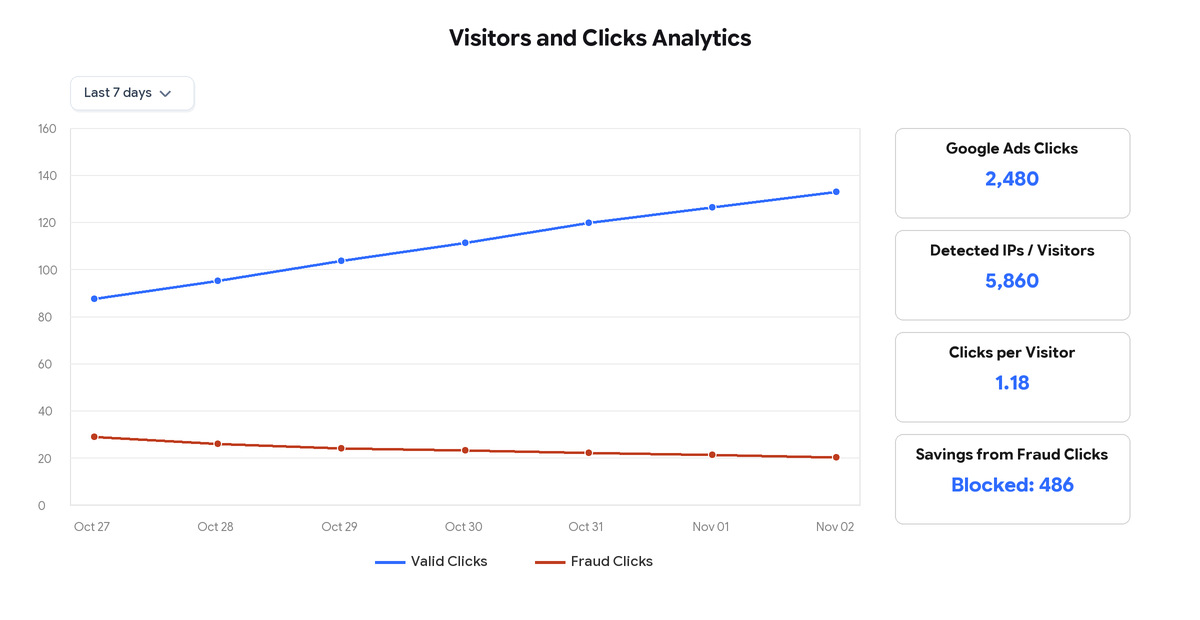
Google filters some invalid clicks before you pay. Sometimes it gives a credit later. That credit only lowers your bill, it is not cash back. And Google never tells you how it decided.
You can see credits in the Invalid Activity Credit Report for Search and Performance Max. You can also block IPs by hand, but Google caps it at 500 IPs per campaign, there is no IP block for Performance Max, and you have to find the bad IPs yourself and keep the list clean.
So the gap is this. Google does not stop the same source from seeing your ad again tomorrow. And it does not send you a ready file to ask for money back. That is why many advertisers add a second tool that does the daily blocking and reporting for them.
If you want to check fast, open Google Ads, go to Insights and reports, then Invalid Activity. If you see regular credits but the same cities keep clicking, you need auto block.
It is usually not hacking. It is boring repeats. Same IP clicks 5 times in 10 minutes. Clicks from a country you do not sell to. Clicks at 2am that leave after 2 seconds. A competitor searching your brand every morning.
Most waste comes from three places. Competitors draining your daily budget. Click farms where people are paid to click. And bots using VPNs to hide where they are. If your budget is gone by noon and real customers in the afternoon never see you, check those three.
Bad leads alone do not mean fraud. Check IP repeats, out-of-area clicks, and time on site. If all three look bad on the same campaign, you need auto-block, not just an alert. Here is how automatic blocking works.
A bad day looks like this. 40 clicks before 10am and only 2 calls. The same IP shows 6 times. Most clicks come from one city you do not target. That pattern is what you block.
These are the 7 names owners compare most when they search for comprehensive protection. All of them offer real-time detection. The difference for you is which ad platforms they cover, how they block, how clear the reports are, and how pricing grows with you.
ClickFraudFree was built for Google Ads and Facebook Ads advertisers who want blocking without manual IP lists. It records each visit that comes from Google Ads. No tool can stop the very first click. After that it scores IP, device, location and behavior. If the source looks like a bot, farm or repeat offender, it adds that IP to your Google Ads exclusion list so your ads stop showing to it. It handles both IPv4 and IPv6.
What helps you most is control. You choose how long to block. 1 day, 1 week, 1 month or forever. You can set rules by keyword, city or country, number of clicks, device type and hour of day. Location rules update automatically every 24 hours. The keyword screen shows which search terms triggered your ads, so you can ADD good ones or EXCLUDE junk terms. All visits and all blocked visits stay in your Reliable IP Record panel, with date, time, location and reason you can review when you check traffic. Our team installs it with you on any website platform. Pricing is by campaigns. Standard $30 a month for 1 to 3 campaigns, Business $60 for 4 to 8, Premium $90 for 9 to 15, Agency custom for 16 or more. No contract, cancel with a button. No free trial because setup needs our team.
Pros
Cons
ClickCease is the best-known name in this space and is now part of CHEQ. It covers Google, Meta and Microsoft Ads according to third-party reviews. It watches traffic in real time, blocks repeat IPs automatically, and shows a heatmap of where suspicious clicks come from. Many small businesses start here because the dashboard is simple.
What helps you most is simplicity. You get automatic IP exclusion, competitor click alerts, VPN and proxy detection, and exportable logs you can use when you ask Google to review traffic. It is designed for marketers, not developers.
Price info from comparison sites shows entry plans around $47 a month, with Starter around $99 a month for 1 website and about 5,000 visits and Pro around $149. Price changes by traffic and billing, so check the official ClickCease pricing page.
Pros
Cons
Lunio started as PPC Protect in the UK and now focuses on high-spend teams. It uses machine learning plus rules to score every click as legitimate, suspicious or invalid. It explains results in campaign language, like which campaign, keyword, placement and location drove invalid traffic.
What helps you most is detail. You get coverage across Google, Meta, Microsoft, LinkedIn, TikTok and more. On Google it pushes IP exclusions automatically. On Meta where IP blocking is not available it builds exclusion audiences. It lists GDPR, ISO 27001 and SOC 2 compliance. Vendor states false positive rate under 1 percent and shows exportable log with campaign, keyword, IP, ISP, device and fraud status.
Price is custom and based on share of ad spend plus channels. No public price list. Vendor states minimum around $500k yearly ad spend, best fit $1M plus. It offers 14-day traffic audit that measures without blocking first.
Pros
Cons
ClickGuard is built for hands-on PPC managers who want to set their own rules. You can create custom filters by IP behavior, device, geo and frequency, then block in real time. It covers Google Search, Display, Shopping, Video and Performance Max plus Meta and Microsoft.
What helps you most is control. Its help docs say it looks at what the visitor does after the click, like mouse movement and time on page, not only the IP. Forensics screens show the full story per click.
Price check shows around $89 a month for about $5k monthly spend, higher as spend grows. Free trial listed.
Pros
Cons
Fraud Blocker focuses on SMB Google Ads advertisers who also get fake leads. It scores every click with AI, blocks bots, competitors and farms, and adds email verification on forms plus 50 plus data points per visitor including IP, device, location, VPN and bot signals.
What helps you most is clarity. You get a clear reason per block, it works on WordPress, Elementor, Shopify and Wix, MCC support keeps sub-accounts separate, and Performance Booster view helps shift budget to cleaner traffic.
Price info from deal sites shows Starter around $49 a month for up to 5,000 ad clicks on 1 website, Pro around $69 a month for up to 10,000 clicks. Other sites list $63 to $79 range. Check official pricing page as tiers change often. 7-day free trial listed.
Pros
Cons
Clixtell bundles click fraud protection with call tracking and website video recorder. For local services you can see click data and watch what the visitor did on the page.
What helps you most is context. You get detection by IP, device ID, network, VPN, proxy, geolocation, keyword, time on page and behavior. Device ID Blocker can keep blocking even if IP changes on mobile. Call tracking helps plumbers, lawyers and clinics connect blocked clicks to real calls.
Price info from comparison sites shows entry around $12 a month, other reviews list Protection around $50 a month up to 10,000 clicks and Agency around $75. Check official page before quoting.
Pros
Cons
TrafficGuard focuses on mobile, affiliate and ecommerce where fraud hits before and after the click. Verified on its official pricing page. Shield plan $49 a month covers up to $30k monthly ad spend, for one website on Google Search Ads. It includes Detection Mode, automated prevention, custom click rules, essential reports and email support. 30-day free trial listed.
What helps you most is clarity. You get pre-click plus post-click checks, transparent reports and guided onboarding. Higher Scale plan is custom for over $30k spend or multi-channel needs, with PMax Shield and dedicated manager.
Pros
Cons
How to pick from these 7 without guessing. First, does it block by itself and how fast do exclusions reach Google. Second, does it catch VPNs, proxies, data centers and IPv6, and does it show you why each click was flagged. Third, can you download IP, time, location, keyword and reason to send to Google. If you run 1 to 3 small campaigns, start with a fixed-price tool. If you spend over $500k a year across many channels, shortlist Lunio and ask for a custom quote.
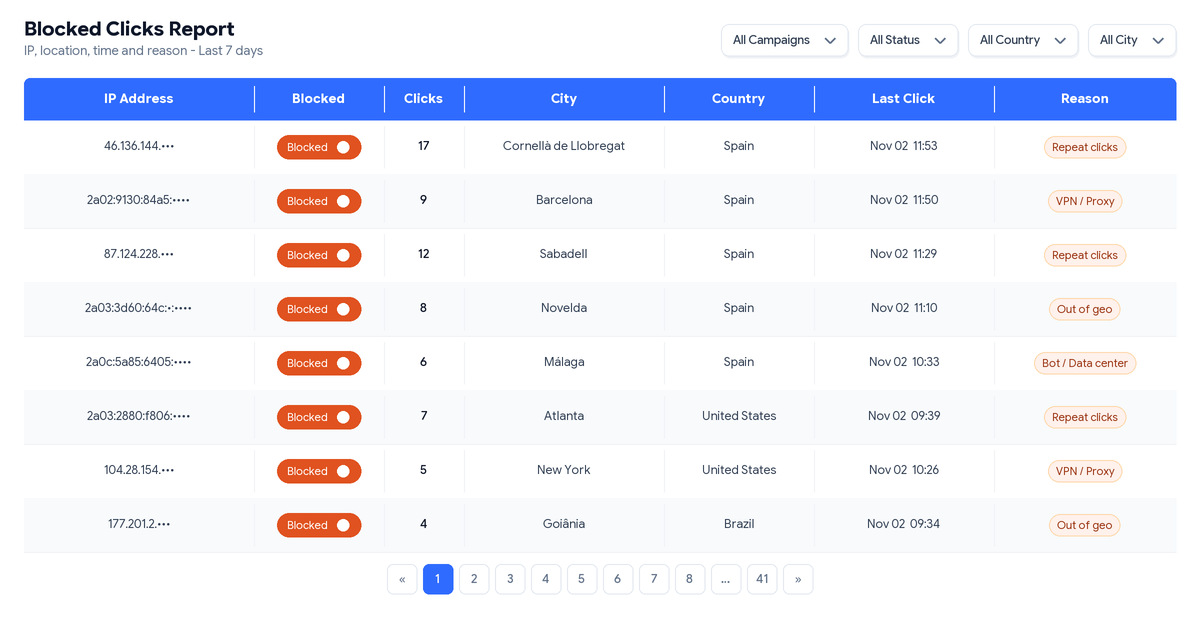
ClickFraudFree for Google Ads logs each visit that comes from Google Ads. No one can stop the very first click. After that we score it, and if it is a bot, farm or repeat offender we put that IP in your Google Ads exclusion list so it cannot see your ads again. We block IPv4 and IPv6.
You pick how long to block. 1 day, 1 week, 1 month or forever. You can set rules by keyword, city or country, clicks, device and hour. Geo updates by itself every 24 hours, you do not have to exclude every city by hand.
Two things owners like most. You see which search terms triggered your ad and you can ADD the good ones or EXCLUDE the junk. Everything stays in your Reliable IP Record panel with date, time, location and reason for each block.
Setup is simple and fast. Step 1. Add one small code to your site. Step 2. Connect Google Ads. Step 3. Pick block time and rules. It works on any platform. Our team helps you install. If you change site later you just put the code on the new site. Run more than 15 campaigns. Ask for Agency. get a free traffic check and we check your invalid rate with you.
Do not buy blind. Take 14 days with your own numbers. Write down spend, clicks, leads and CPA. Do not touch bids in the middle or you will not know what helped.
Days 1 to 2. Put the code on all pages your ads send to and connect Google Ads. Days 3 to 7. Look at why each click was flagged. Same IP. Same city outside targeting. Your own office. Learn how to undo a block. Days 8 to 14. Compare same length periods, remember leads come late, then decide what you would really block.
Then start with your most expensive Google Ads account. Once blocks are stable, add Facebook Ads protection. See pricing by campaigns and pick Standard, Business, Premium or Agency.
Quick checklist before you pay. It blocks by itself. You see the reason for each block. You can export IP, time, location and reason. Pricing fits your number of campaigns.
1. What is PPC fraud protection
It watches your Google Ads clicks and blocks bots, competitors and farms so you only pay when a real person might buy. Google filters some for free, a tool does the blocking and upkeep.
2. How does ClickFraudFree stop them
It logs IP, device, location and behavior, scores the risk, then puts bad IPs in your exclusion list. You set time and rules.
3. Does it work for Facebook Ads
Yes, separate plans for Google and Facebook. Most start with Google because clicks cost more there.
4. How much will I save
Depends on competition. Do not just do flagged clicks times CPC, Google already filtered some. In hard niches where a click is up to 50 euro, we have seen around 25 percent less waste in real tests. Check your IP report first.
5. How do I ask Google for money back
Export your blocked IP report from your dashboard with date, time, location, keyword and campaign for each bad click. Send it to Google as evidence. Google decides if you get a credit, no tool can promise a refund.
6. Is there a free trial or contract
No free trial, our team installs it with you. Cheapest is $30 a month, no contract, cancel with a button.
7. Where is pricing
On the Google Ads pricing plans. Standard 1 to 3 campaigns, Business 4 to 8, Premium 9 to 15, Agency 16 plus custom. All include IP block, geo block, device block, time block, keyword block.
8. Can it block a real customer
Yes if rules are too tight. That is why you see why it was flagged and you can undo it. Watch the first week closely.
9. Does it catch VPNs and IPv6
Yes. It checks VPNs, proxies, data centers and IPv6, not only basic IPs. You see the reason in the log.
10. Can I keep good keywords and block junk
Yes. The keyword screen shows what triggered your ad. ADD what converts and EXCLUDE what wastes spend.
Most customers are small shops and agencies on Google Ads. Same story every time. Lots of clicks, budget gone early, no extra calls. After we turn on blocking, repeats stop seeing the ads and the same budget lasts the day.
We do not write reviews here. You can read real ones from advertisers on our Google Business Profile. Google checks that they are real, we cannot edit them.
Use ClickFraudFree already. Share your results on Google.

How does click fraud detection benefit digital advertising campaigns? Digital advertising has evolved into one ...

Elevating Digital Advertising Strategies with Comprehensive Fraud Protection from ClickFraudFree In the ever-competitive world of ...
Who offers the trendiest solutions for ad fraud detection? Ad fraud detection has become one ...

Understanding Click Fraud Click fraud is a malicious activity that affects online ad campaigns by ...

How ClickFraudFree Identifies and Stops Fake Clicks Before They Harm Your Ads In the world ...

Secure Your Digital Ads for 2025: Choose ClickFraudFree for Safety As digital marketing continues to ...

What are the trendiest ad fraud prevention solutions for Google Ads campaigns? As Google Ads ...

Why Click Fraud Prevention is Critical for Your Advertising Strategy with ClickFraudFree In today’s digital ...

What are the trendiest ad fraud solutions for Google Ads campaigns? Running Google Ads campaigns ...

What are the most effective click fraud detection services for Google Ads campaigns? Preventing click ...

What are the most popular tools for securing ad campaigns from fraud? Securing online advertising ...

Unlocking Revenue – Monetizing Your Campaigns with ClickFraudFree In the ever-evolving landscape of digital advertising, ...


10 Ways Click Fraud Could Be Sabotaging Your Campaigns Right Now with ClickFraudFree In the competitive landscape of digital advertising, every click counts. But what

The Importance of Real-Time Analysis in Click Fraud Prevention Within the ever-evolving landscape of digital advertising, the persistent challenge of click fraud has become a

How does click fraud detection benefit digital advertising campaigns? Digital advertising has evolved into one of the most powerful growth engines for modern businesses. From
